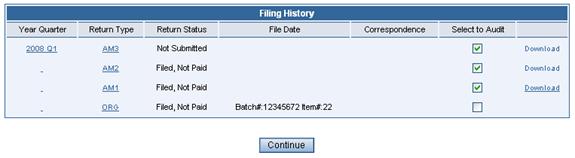
Filing History / Audit Selection Page
Selecting Returns for Audit
The Filing History Page allows selection of multiple returns for audit processing, viewing of correspondence and return information.
¨ Click on the underlined link under Year Quarter to see a brief summary by fuel type and a summary by Jurisdiction.
¨ Click on the underlined link under Return Type for a display of the Totals by Fuel Type and Totals by Jurisdiction. See the Return Type Detail Page (below).
¨ If there is correspondence available on the account, a link will be presented in the Correspondence column. Click the link to retrieve a PDF version of the original correspondence.
¨ Click the Download link in the far right column to download the data from any return.
¨ Put check marks in the checkbox under Select to Audit and press the Continue button at the bottom of the page.