View Decal Summary
Select the account from the Account Inquiry section. In the Decals section of the application, click View Decal Summary option in the left navigation.
The Renewal and Decal History pane displays information for up to the past three years starting with the Filing Date, the number of Decals Requested, the Total Decals the taxpayer should have available, and the number of vehicles in the fleet. Room is provided for a reason code, mailed date, and Status of the decal (or renewal) request.
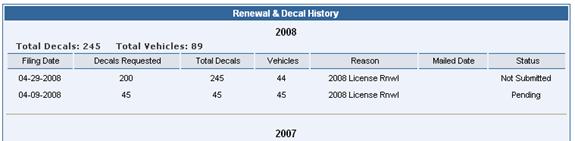
Decal Status will be listed as:
¨ Ordered
¨ Processed
¨ Shipped
¨ Voided
License Status will be listed as:
¨ Ordered
¨ Not paid
¨ Not submitted
¨ Pending
¨ Processed (shipped)
¨ Repair